
Inside the Groundwork Simulator Game Engine: Physics and Tech Breakdown
Explore the advanced Groundwork Simulator game engine, detailing its realistic soil deformation, heavy machinery physics, and hardware requirements.
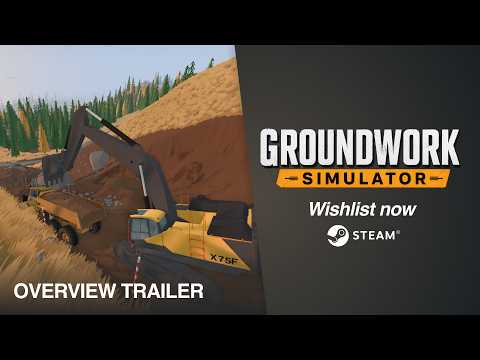 Official mediaExplore the advanced Groundwork Simulator game engine, detailing its realistic soil deformation, heavy machinery physics, and hardware requirements.YouTube
 Understanding the Technology Behind the Dig
When simulation games step into the realm of true-to-life earthmoving, the software running under the hood matters more than ever. The newly launched Groundwork Simulator game engine handles complex interactions, transforming static landscapes into dynamic environments where every scoop of dirt reshapes the world. If you have ever wondered how digital heavy machinery manages to feel genuinely heavy, the secret lies entirely within the physics architecture of the Groundwork Simulator game engine.
Simulation enthusiasts and tech-minded players alike are discovering that this title is far more than a simple sandbox. Behind its modest system requirements lurks a heavy processing burden centered on CPU-intensive calculations. Whether you are slicing into an untouched hillside, routing water pumps across a rocky claim, or hauling paydirt to a wash plant, understanding the technology powering your excavator helps you optimize your setup and master the art of virtual mining.
Deformable Soil and Procedural Landscape Modification
The core appeal of the title centers on topographical alteration. Unlike traditional games where terrain remains static, the software utilizes a dynamic voxel or heightmap modification system that logs every single bucket load.
When you drive an excavator into a slope, the program does not simply play an animation. It actively recalculates vertex data and voxel densities in real-time. This dynamic reshaping creates genuine tactical challenges.
| Terrain Action | Software Calculation | In-Game Consequence |
|---|---|---|
| Deep Trenching | Voxel removal & mesh updating | Creates new navigation routes and steep walls |
| Piling Material | Heightmap accumulation | Generates temporary ramps or obstacles |
| Surface Scraping | Topsoil layer subtraction | Exposes underlying paydirt strata |
| Heavy Hauling | Traction and friction variance | Affects wheel slippage and vehicle speed |
Community reports indicate that leaving behind poorly planned trenches can genuinely trap your transport trucks later on. This level of environmental persistence proves that the underlying software treats the earth as a persistent, physical asset.
Simulated Hydraulics and Machine Feedback
Heavy machinery requires realistic resistance to feel authentic. The developers implemented a proprietary resistance model that simulates hydraulic pressure within the mechanical arms of your vehicles.
When your bucket slams into dense earth, the Groundwork Simulator game engine registers the counter-force. It routes this resistance back into your control inputs, creating a noticeable struggle as the arm strains against unyielding ground.
| Machinery Component | Simulated Element | Gameplay Impact |
|---|---|---|
| Boom & Bucket | Hydraulic fluid pressure | Determines maximum lifting capacity under load |
| Treads & Tires | Surface traction coefficients | Dictates ability to climb muddy slopes |
| Chassis Weight | Center of gravity shifts | Risks tipping over when hauling heavy buckets |
| Engine Load | Torque output vs. resistance | Slows down movement during heavy excavation |
According to player experience feedback shared on platforms like the Steam Store page for Groundwork Simulator, managing these hydraulic limits is the key to efficient digging. If you try to bite off more earth than your machine's hydraulics can handle, the bucket stalls out, forcing you to adjust your approach angle.
Hardware Demands: Why CPU Power Rules the Simulation
At first glance, the visual fidelity might lead you to believe the software can run on virtually any modern system. However, the simulation's system requirements tell a different story.
The software places an unusually heavy load on the central processing unit due to simultaneous tracking of soil deformation, water hose routing, fluid dynamics, and vehicle physics calculations.
| Hardware Tier | Recommended Component | Performance Expectation |
|---|---|---|
| Minimum CPU | Intel Core i5-8400 / AMD Ryzen 5 2600 | Stable baseline performance at lower settings |
| Recommended CPU | Intel Core i5-12400 / AMD Ryzen 5 5600 | Smooth physics ticks and stable frame rates |
| Minimum RAM | 16 GB | Necessary to cache active terrain data |
| Recommended RAM | 24 GB | Prevents stuttering during large-scale excavations |
Tech enthusiasts should note that upgrading your CPU often yields better performance improvements in this specific software than investing solely in a high-end graphics card.
Fluid Dynamics and Ancillary Systems
Excavation is only half the battle. Once you secure the paydirt, the software transitions into managing fluid networks.
Pumps, hoses, and wash plants require continuous calculations to ensure water pressure remains steady across the entire worksite.
[Water Source]
      │ (Pumps & Intake)
      ▼
[Hose Network]
      │ (Pressure Routing)
      ▼
[Wash Plant / Sluice Boxes]
      │ (Material Separation)
      ▼
[Shaking Table] ➔ [Gold Recovery]
This pipeline demands steady processor allocation. If your layout stretches hoses too thin or fails to account for elevation changes, water pressure drops, halting your entire processing line.
Frequently Asked Questions
What makes the Groundwork Simulator game engine so demanding on hardware?
The software continuously calculates real-time soil deformation, complex hydraulic resistance, vehicle physics, and fluid dynamics simultaneously, placing a massive computational load on the CPU.
Do I need a high-end graphics card to play?
While a dedicated GPU like an NVIDIA GTX 1070 or RTX 3060 is required, your CPU and system RAM play an even more vital role due to the heavy physics calculations handled by the software.
How does the software handle terrain modification?
Instead of static textures, it uses dynamic mapping to track every scoop of earth, allowing players to permanently alter topography, dig trenches, and create new roads across the map.
Can I play this simulation with friends?
Yes, the title supports online co-op, allowing multiple players to coordinate heavy machinery, transport, and washing operations on the same shared worksite seamlessly.
Related Guides
Exploring the Groundwork Simulator Map Studio and Early Access Features
Dive into Groundwork Simulator map studio details, heavy machinery physics, and early access gameplay mechanics to master your gold mining setup.
Groundwork Simulator Mod Support: What to Expect for Custom Content and Maps
Discover everything you need to know about Groundwork Simulator mod support, custom maps, early access updates, and heavy machinery gameplay.